Citadel Media Player Troubleshooting
How to Fix Buffering After an Update
If your Citadel Media Player has recently received an update but is continually buffering, follow these quick steps to clear the cache and refresh your system.
Instructions
Using your player remote, press the BACK button, then select LOG OUT.
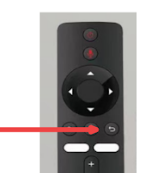
Unplug the player from its power source, then plug it back in.
Enter your PIN when prompted on the screen.
What to Expect Next
Performing the steps above clears all old, cached content from your player and forces it to download a fresh batch.
Wait Time: The new download can take 30 to 60 minutes.
Keep the Power On: Please leave the player turned ON to allow it to fully pull the new content.
Normal Behavior: You will continue to see a "spinning wheel" on your screen while the download is in progress. This is completely normal!
Was this article helpful?
That’s Great!
Thank you for your feedback
Sorry! We couldn't be helpful
Thank you for your feedback
Feedback sent
We appreciate your effort and will try to fix the article